How to Turn Everyday Work into Robotics Training Data
By General Intelligence Labs Team
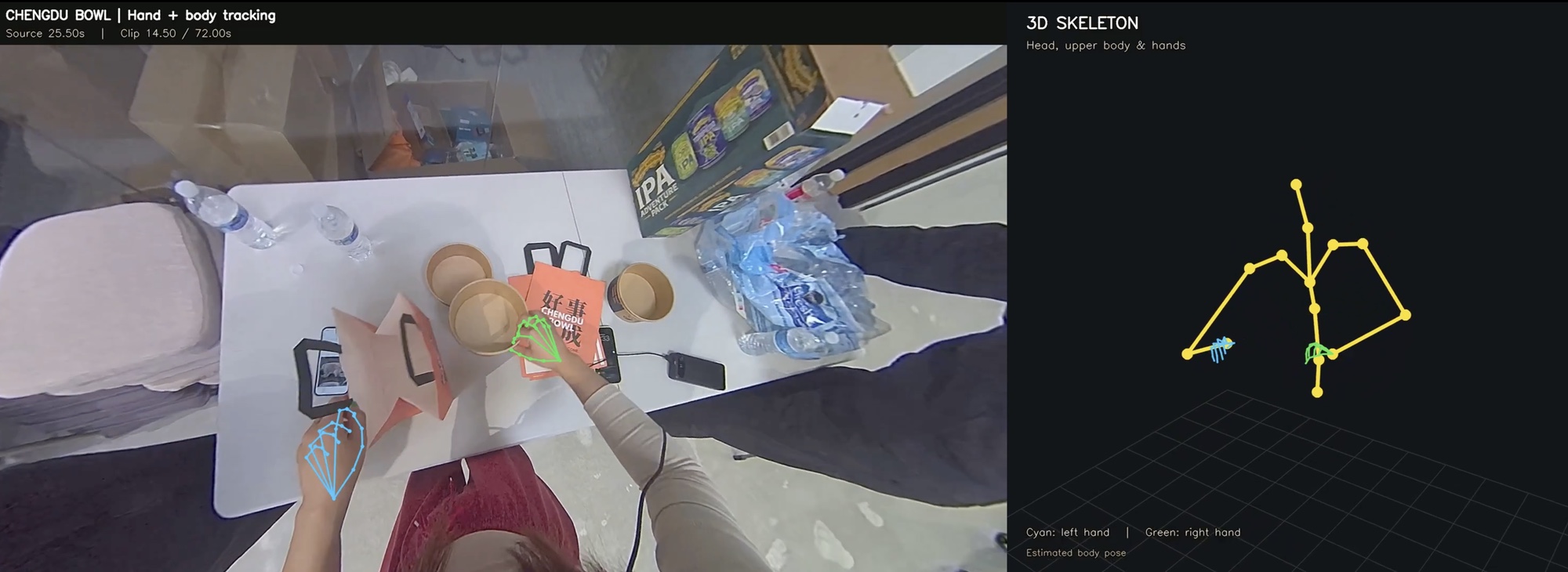
GI Labs combines wearable capture hardware and a managed data pipeline so that companies can turn everyday work into robotics training data: data they can use in their own automation projects or license to robotics developers.
Your employees already know how to do things a robot would need to learn. They handle unfamiliar objects, work around awkward spaces, and adjust their movements when a task goes differently than expected. Much of that knowledge isn't in your written procedures. Your people simply figure it out. Robots can't yet make the same adaptations in the moment, and the way they learn to is from recorded examples of people doing the work.
For a company in manufacturing, construction, maintenance, or food service, preparing for robotics can start with documenting a carefully chosen part of that work. You can collect human demonstrations before owning a robot, learn what makes those recordings useful, and build a dataset that reflects your own operation.
That takes more than putting a camera on someone. The recording has to capture the right activity, preserve timing and sensor information, and go through processing and quality review. General Intelligence Labs brings those steps together through its EGO1 and EGO1GS capture headsets and a managed data pipeline.
Why collect robotics data before deploying robots?
Robots are already moving into everyday production. BMW reports that the Figure 02 humanoid robot supported the production of more than 30,000 BMW X3 vehicles at its Spartanburg plant, and that its successor is now starting on sequencing work in logistics there.[1] We expect robotics to become a standard part of how physical businesses operate, with adoption spreading task by task as capabilities improve and deployment becomes economical.
That creates competitive pressure well before robots can perform every part of a job. A company that automates one expensive or capacity-constrained task may be able to take on more work, deliver faster, or price more aggressively. Its competitors will have to respond even if most of their industry still runs on human labor.
Starting early gives you time to build useful data and the experience to use it. Your operation has particular tools, materials, layouts, and working conditions. Capturing those details, checking the results, and correcting gaps takes repeated collection cycles. Beginning now lets your team work through that process while normal operations continue. When you evaluate a robotics project, you can bring reviewed examples of your actual work and a clearer understanding of what a robot would need to handle.
Starting early also builds the data infrastructure that makes your company ready for physical AI. When a digital business prepares for AI, it builds the harnesses, data tracing, and evaluation platforms that let it put large language models to work on daily tasks. Physical AI needs the same groundwork. The data flywheel behind a deployed robot, from capture through processing, review, and retraining, is infrastructure, and it takes time to set up. A company that has it in place can act as soon as the models are good enough to deploy.
Waiting can cost you business while you catch up. If a competitor reaches lower costs or greater capacity through robotics first, you may face pressure on prices, margins, and delivery times. Contracts can move to the business that can fulfill them more economically or reliably. At the same time, you may be funding a rushed preparation effort, correcting avoidable collection problems, or repeating recordings that turned out to be unusable. Lost revenue and tighter margins make that catch-up work harder to fund.
The timing will differ across industries, and collecting data alone does not produce those operating gains. The advantage comes from building useful data around tasks worth automating and using it to support a successful deployment. Starting with one recurring activity, a defined set of outputs, and a reviewed sample lets you begin that preparation before competitive pressure forces the schedule.
How to turn everyday work into robotics training data
Collecting robotics data starts with deciding which work you want robots to learn. From there, the process moves through recording, data preparation, and choosing how to put the resulting dataset to use.
1. Choose the tasks you would want a robot to do. Look across your workflow for tasks that are repetitive, labor-intensive, or physically demanding, where you can see the return on deploying a robot. These can be as simple as picking items into a bin, packing an order, or inspecting a component. Identify what successful completion looks like and the variations workers encounter: different objects, layouts, and exceptions. This determines what to record and which information the dataset needs to contain.
2. Record workers performing the task with the right sensors and viewpoint. A wearable camera system captures the worker's view and their hand movements while they do the job. Depending on the task, you may also need depth, body movement, or contact force. The goal is to capture the information needed to understand the action, including details that ordinary video misses.
3. Process and review the recordings to create a usable dataset. Not all captured data is training-ready. The video and sensor streams have to meet quality requirements, including correct calibration and adequate exposure. The data also has to contain the signals you want a model to learn. If the task is two-handed assembly, the recording needs both hands in view throughout. Recordings may also need to be divided into task attempts and labeled with instructions or outcomes.
4. Put the dataset to work in robotics development or licensing. You can use your data with an internal team or a robotics partner to train and evaluate robots for your operation. You may also be able to license it to model developers who need examples of those tasks and environments, as a new revenue stream. Neither path is automatic. Deploying robots requires further development and testing, and licensing requires a buyer who finds the dataset useful. Data infrastructure providers like GI Labs maintain relationships with model developers and can facilitate introductions for licensing.

How GI Labs' hardware and data pipeline work together
Recording someone doing a job gives you a visual record, but that footage does not by itself tell a robot how to perform the task. A robotics team also needs to know how the worker's hands moved through space, how far away objects were, and which movements came from the camera itself. GI Labs' headsets capture synchronized video and motion data, and our processing pipeline uses that information to reconstruct movement and depth. Quality checks identify gaps and unreliable results, and storage keeps every output linked to its original recording. Together, these steps produce a structured dataset that a robotics team can evaluate and adapt for training.

1. Record the work from the worker's point of view
Our headsets collect egocentric data, meaning data recorded from the wearer's perspective. Two cameras record paired views of the scene. A motion sensor records how the headset moves. Hardware timestamps keep those streams aligned, and the calibration that describes the cameras travels with the recording.
Both headsets support this approach, with different capture capabilities.
| Hardware | What it captures | What that means for collection |
|---|---|---|
| GI EGO1 | Synchronized stereo video and IMU motion data, recorded together on one clock | A wearable starting point for first-person demonstrations, with local recording and Wi-Fi offload |
| GI EGO1GS | Global-shutter stereo video, a 400 Hz IMU, stereo audio, and on-device hand detection | Captures each frame at one instant, so fast motion stays geometrically straight. Checks framing while the work is being recorded |
EGO1GS runs EgoHand on the headset to detect the wearer's hands in every frame. When both hands leave the camera's view, the headset warns the operator by voice so they can adjust framing during the session. That is a chance to fix a collection problem while the task is still happening.
2. Transfer a complete recording
Processing needs the source recordings together with their calibration and timing information. Calibration describes the cameras and their relationship to each other, which the software needs to interpret the paired images and reconstruct movement and depth. Each session is recorded into a single .mcap file that carries all of this.
The project also needs an agreed activity, the desired outputs, and a transfer method. Keeping that information with the recording helps the processing team understand what it is expected to produce and review.
3. Reconstruct movement and scene information
Post-processing converts the recordings into outputs that are easier for a robotics team to inspect and use. Depending on the agreed scope, these can include:
| Output | What it describes | Why it is useful |
|---|---|---|
| Camera trajectory | How the camera, and so the worker's head, moved through the scene | Separates camera motion from motion in the work being recorded |
| 3D hand motion | Estimated hand positions and movements in three dimensions | Gives a development team a structured representation of visible manipulation |
| Body pose | Estimated position of the head, upper body, and hands | Places the hands in the context of the worker's posture and reach |
| Scene depth | Estimated distances within the recorded scene | Adds spatial information to the camera images |
| Source data and quality records | The underlying recordings, processed results, and documented findings | Lets the recipient review an output alongside the evidence used to produce it |
Our technical overview of EGO1 processing explains how calibrated stereo video and motion measurements support reconstruction of camera movement, hands, and depth. The usable result depends on both the recording and the processing applied to it.
4. Check quality and document exceptions
Cleaning data includes identifying missing or inconsistent results and making those issues visible to the recipient. A file can open correctly and still contain gaps that matter for the intended use.
The managed workflow checks that the agreed outputs are present, readable, and aligned in time. Processing logs and review evidence accompany the delivery, with identified exceptions documented. This lets a development team judge which outputs fit its requirements and which need further attention.
Where there is no independent reference measurement, review can assess plausibility and consistency. Claims about absolute accuracy require appropriate ground truth and testing.
5. Store linked records and deliver the agreed dataset
Storage keeps source recordings, processed outputs, and quality records connected throughout the project. A recipient can trace any processed result back to the recording it came from and review the associated findings.
The delivery brings the selected source data and agreed outputs together in a readable package. Transfer and storage arrangements belong in the project scope so both teams know where the data will live and how it will be handed over.
You control the downstream use of the delivered data. A robotics partner may need to adapt it, combine it with other demonstrations, and test it against the requirements of a particular model and robot.
Why buy the hardware and data pipeline from one vendor?
Hardware determines which signals get recorded. Software determines what can be reconstructed from them. Both need to be designed around the intended use of the data.
When you assemble a collection system from separate products, someone has to make their assumptions match. The processing software needs to understand the cameras, calibration, timing, and recording format. When a result looks wrong, someone has to determine whether the problem began during capture or during processing.
For a physical business entering robotics, that can mean taking on computer vision and data engineering work before it has evaluated its first useful dataset. A combined system gives one team responsibility for the connection between recording and processed output.
At GI Labs, we design the capture hardware and the processing together. We train models, including hand detection, on recordings from our own devices. Our team can investigate problems on both sides of the workflow.
EgoHand is a concrete example. In a workplace with several people nearby, detecting a hand somewhere in an image is not enough. The system needs to identify the hands of the person wearing the headset. We built EgoHand around that distinction using our own egocentric footage, and its on-device role lets the headset check framing during capture. Our EgoHand article explains that design.

The check on the headset improves the input. The data pipeline then reconstructs the agreed movement and depth outputs from the recordings and documents their quality. These are different jobs within the same system.
A capable technical team can integrate equipment and software from multiple vendors. Buying the combined system reduces the integration and troubleshooting your own team has to manage. It also gives improvements in capture a direct path into processing, and processing problems a direct path back to the people designing the hardware.
Start with one activity and a reviewed sample
Choose a recurring task that matters to your operation and could plausibly become part of a robotics project. Define what you need the recording to show, then agree on the outputs and review criteria before expanding collection.
A first project should answer practical questions:
- Can the setup capture the important parts of the task while people work?
- Does the recording contain the information needed for the requested processing?
- Can the recipient inspect the outputs, trace them to their source, and understand any gaps?
- What should change before the next collection?
Your team brings knowledge of the work, access to the environment, the arrangements needed to record there, and a contact who can review the sample. GI Labs brings the capture hardware and the managed processing workflow. The project defines the outputs, transfer, storage, and acceptance criteria.
Talk to GI Labs about the task you want to capture and the data you want to build: book a call or write to hello@gilabs.xyz. Start by evaluating one activity and one processed sample, then use the results to decide what to collect next.