01
DS · imported predictionEGO2 Pro
UPPER · F1 / F2
LOWER · D1/D2/S1/S2
Directional coverage
Rear −180°Left −90°Forward 0°Right +90°Rear +180°
Overlap counted once · occlusion not modeled
EGO2 SERIES / ENGINEERING EXPLORER
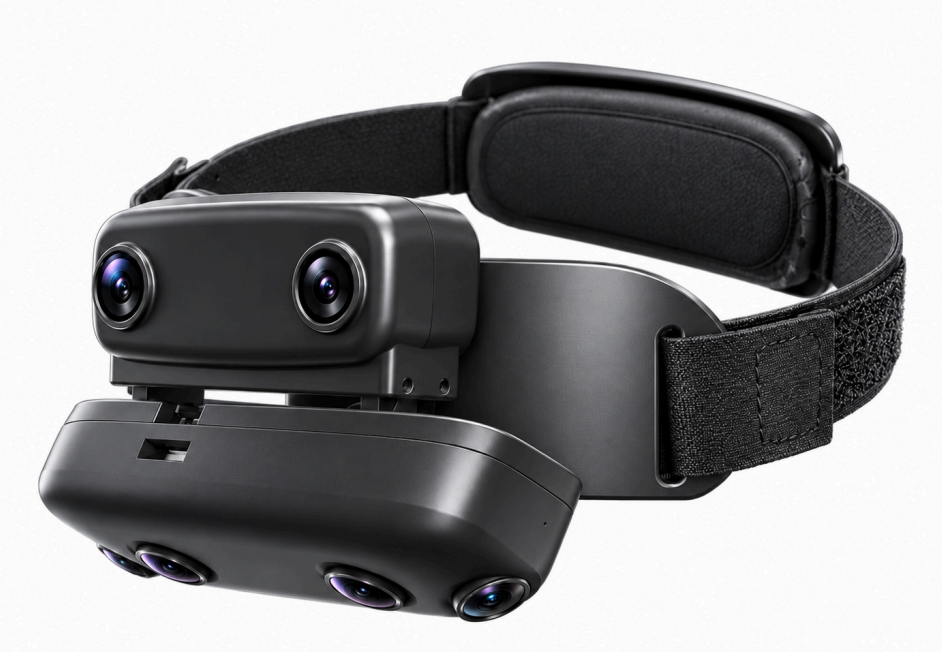
Explore six camera views around the head and hands. Adjust the camera angles and housing tilt to see how directional coverage changes.
2 upper cameras
4 lower cameras
Upper-body reference · schematic proportions · occlusion not simulated
Overlap counted once · occlusion not modeled
CAMERA VISIBILITY
Toggle forward, downward or side cameras. Use the angle controls below to enable individual cameras and edit their poses.
EGO2 Pro · MODULE POSE
Module pitch is measured in the global/head frame: positive tilts upward, negative downward. Choose local or global yaw/pitch/roll inputs below; the corresponding angles in the other frame appear underneath. Tilting a module keeps its cameras’ local settings fixed and updates their global angles.
Each housing rotates about its center for this layout preview; pivots are assumed and support brackets stay fixed. Current local yaw, pitch and roll use the upper or lower module shown beside each EGO2 Pro camera. Original values show the fixed STEP-local reference; original local roll is derived from the existing 0° global sensor-roll assumption. Roll is editable in either frame. Yaw/pitch edits preserve your chosen local roll; module tilts preserve the complete local pose.
Yaw, pitch and roll are editable in either frame. Yaw/pitch edits preserve your chosen local roll, so global roll may change. Editing roll rotates the image axes without changing the viewing direction.
Switching frames only changes the inputs and readouts. It does not move the cameras. The other frame appears beneath each input; Original always refers to the local reference.
Explore six cameras arranged in forward, downward and side-facing pairs. The default upper and lower module tilts are +20° and −44.99°. Side cameras point at −67.5° / +67.5° yaw and −21° pitch in the head frame.
Use the head frame to adjust a camera relative to the wearer, or the module frame to adjust it relative to its housing. Negative yaw points left; negative pitch points down. Roll rotates the image around the viewing direction. Tilting a module moves its cameras together; switching frames only changes the displayed coordinates.
Reset all restores the default setup. The STEP reset controls restore the original design angles while retaining your other adjustments. Individual camera edits change the coverage preview; lens barrels remain fixed to the housing model.
The preview combines the headset’s CAD geometry with a predicted Double Sphere lens model. Camera alignment, sensor roll and head fit are approximate. Measured calibration is needed to confirm real-world coverage.
Switch to rectified coverage to preview a perspective view from each camera. The default 16:9 views span 125.3° × 94.8° for the upper pair and 133.9° × 105.8° for the lower four cameras. Adjust the output field of view to explore different crops; only directions captured by the source camera count toward coverage.
This preview models each camera separately. It does not show a calibrated stereo pair.
The percentage estimates how much of the full sphere of viewing directions is covered by at least one enabled camera. Overlap counts once. Colors identify camera groups; stripes show where their views overlap. Results update as you change camera angles and settings.
The model excludes camera spacing, scene depth and occlusion by the wearer, headset or objects. Overlap does not guarantee usable stereo depth, and the drawn surfaces do not indicate sensing range.
LENS PARAMETERS · DOUBLE SPHERE
Expand the lens panel to see the upper and lower camera parameters. EGO2 Pro preserves the imported optical prediction.
Imported EGO2 Pro prediction, not a measured AR0235 calibration. F1 / F2 use a 1920 × 1080 image window; the lower four cameras use 1920 × 1200. The additional radial limit clips the image boundary in normalized projection-plane coordinates.
Coordinates run from 0 to 1 across each image dimension. fₓ / fᵧ are normalized focal scales; cₓ / cᵧ are the optical center (0.5 is centered). For pixel intrinsics, divide x values by width − 1 and y values by height − 1.
SOURCE IMAGES